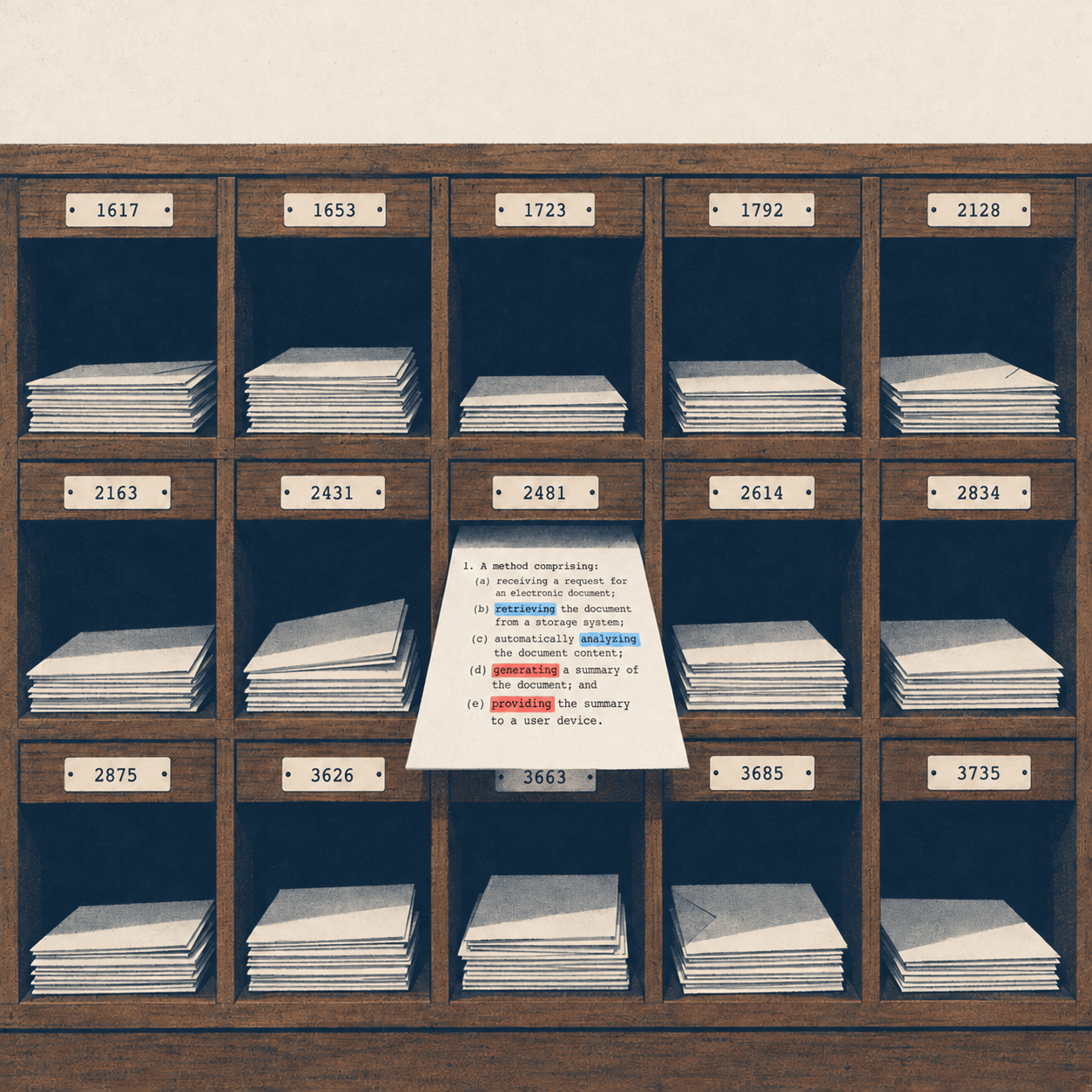
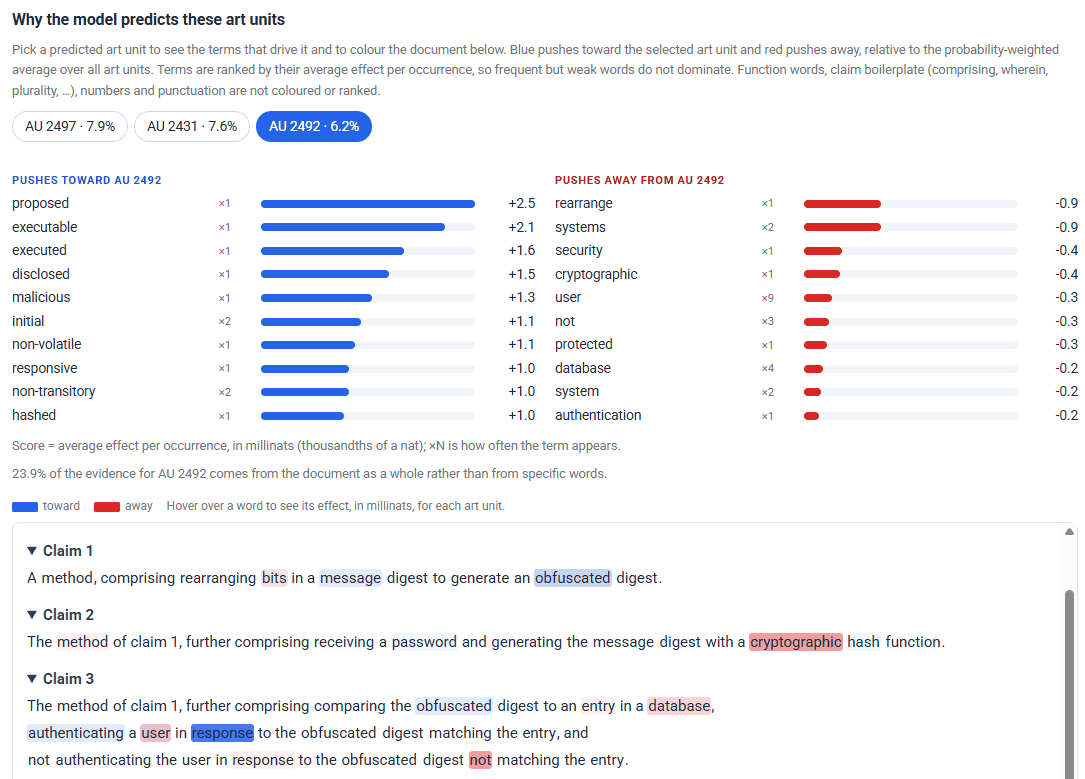
Every word in your claims, scored in context for each likely art unit: blue pulls toward it, red pushes away.
What’s new
Steer your application toward or away, using fully contextual term effects
Most explanations of art unit predictions are keyword lists. A word shows up often in an art unit’s applications, so it gets flagged as “associated with” that art unit. That approach has two blind spots. First, it ignores context: it treats “manifold” the same whether it’s an exhaust manifold, a fluid manifold in an infusion pump, or a manifold in a geometry-processing claim. Words don’t carry meaning on their own. Context does. Second, it only points one way. A frequency list can tell you what an art unit’s applications tend to say. It can’t tell you which words in your application are working against that art unit, because it has no concept of pushing away.
Our predictor works differently. The model reads your title, abstract and claims together, and its reading of every word is shaped by the words around it. The explanation comes straight from the model: each occurrence of each word gets its own score for each of the top art units, and those scores add up to the prediction. It isn’t a frequency table, and it isn’t a separate approximation added afterward. It is the model’s own reasoning. So a word doesn’t get one fixed score. Its effect depends on what it is doing in that sentence, and the report shows you every occurrence separately.
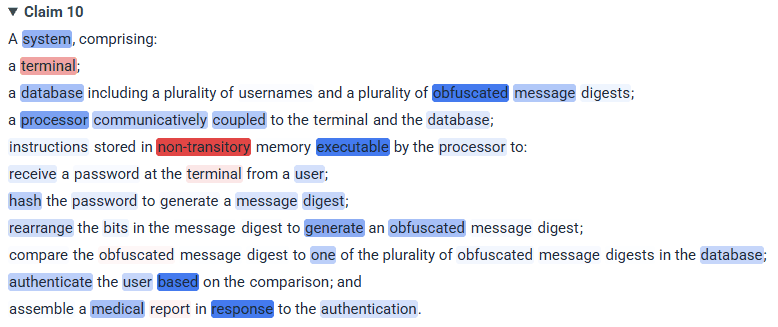
One claim, one word, four different weights. “Obfuscated” counts most where it defines what the database stores, less where the digest is generated, and hardly at all in the comparison step. A keyword list would score all four the same.
The same claim shows the other half of the story, and for many practitioners it’s the more useful half. “Non-transitory” and “terminal” are shaded red: generic computer language is pulling the application away from this art unit. And a single word in the last line, “medical,” pulls toward it. If you’re wondering why an authentication claim is drifting somewhere unexpected, this is how you find out, phrase by phrase.
Because every score comes from the model’s actual prediction, a score can be negative as well as positive. Each occurrence of each word either adds to an art unit’s probability or takes away from it, and the report shows both. That matters because steering works in both directions:
- Toward an art unit you want. The blue terms show what is earning you a place there, so you know what to keep. The red terms show what is holding you back.
- Away from an art unit you don’t want. Switch to that art unit’s tab. The blue terms show what is drawing you in, so you know what to rework. The red terms show what is already keeping you out, so you know what to protect and build on.
A keyword list can only answer half of that. If you’re trying to stay out of a business-method art unit, knowing which of your phrases are already pushing you away from it is at least as valuable as knowing which ones are drawing you in. It might be more valuable, because it tells you what not to cut when you revise.
In the “Why the model predicts these art units” explorer you can:
- switch between the top three art units and watch your document re-shade, blue for words pulling toward that art unit and red for words pulling away;
- hover over any word to see its effect on each art unit;
- see the terms that matter most in both directions, the strongest pulls toward each art unit and the strongest pushes away from it, ranked by their average effect per occurrence, so a word that appears forty times doesn’t drown out the one phrase that really decides the prediction;
- see how much of the prediction comes from the document as a whole rather than from particular words.
If a business-method art unit is near the top of the list, you can see exactly which phrase in which claim is sending it there, and which phrases are already pulling you away. Rework the first kind, keep the second, and re-run in seconds, while the claims can still change.
Keyword frequency is where interpretability starts. It tells you what’s associated with an art unit. In-context attribution, computed from the model’s own reasoning, tells you what is helping, what is hurting, and by how much. That is what machine learning practitioners rely on when the answer matters. Your application deserves the second kind.
Predicted CPC classifications: an instant sanity check and a search head start
The predictor also shows how it classifies your application. It lists the most likely CPC subclasses and main groups, each with its full title, learned from the classifications the Office has assigned to millions of published applications. Hover over a code to see where it sits in the CPC hierarchy, from section down to main group. Legacy USPC classes are included too, for anyone who still thinks in them.
- An instant sanity check. The CPC titles tell you, in plain words, what the model thinks your application is about. If you wrote a medical imaging application and the top codes are about general-purpose data processing, the model is reading your claims differently than you intended, and a classifier at the Office may read them that way too. You’ll see it in seconds, and the explorer will show you the language responsible.
- Data-driven codes for prior art searching. A CPC code is one of the most efficient ways into the literature. Instead of guessing at codes from the scheme, you start from the codes the evidence points to. Take the top subclasses and main groups to the USPTO’s search tools, Espacenet or any database that supports CPC searching. Use them for a pre-filing search, to map the landscape your application will be examined against, or to find the art an examiner is likely to search.
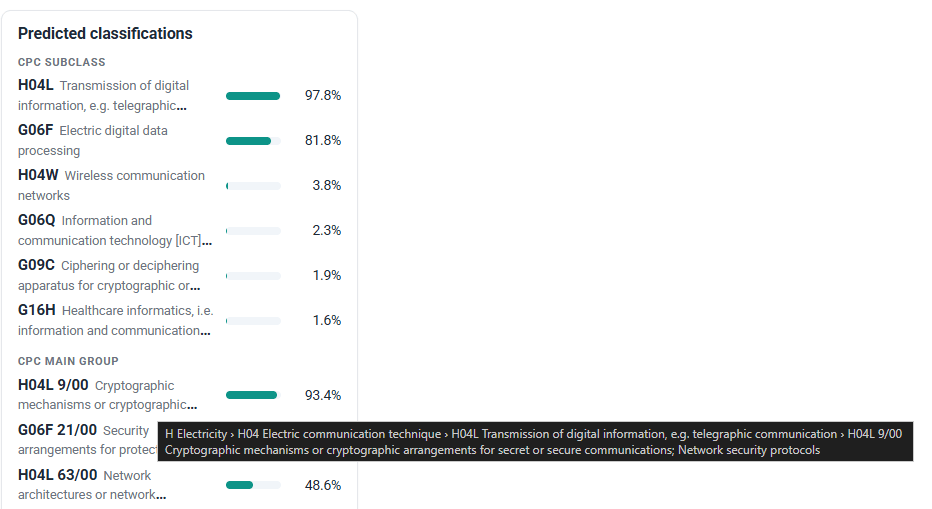
Read the titles as a check on how the model understood your application, then use the codes to start a search.
The prosecution outlook, right in the report
A prediction on its own leaves the real question open: is that a good place to land? Until now, answering it meant running the prediction, looking up each art unit separately, and piecing the comparison together yourself. Now it’s all in one report.
For each of the top three art units, the predictor pulls that art unit’s own historical prosecution statistics, not a blended average:
- allowance rate
- office actions per case
- months to disposal
- how much an interview helps
- PTAB reversal rate
A baseline row for the group sits underneath, and every cell is shaded by how that art unit compares with its peers. You can see at a glance whether your likely destinations are friendly or tough. For the top art unit you also get a disposal timeline, outcome rates with and without an interview and after RCE, final rejection and appeal, strategic recommendations, and recent dispositions with links to Patent Center.
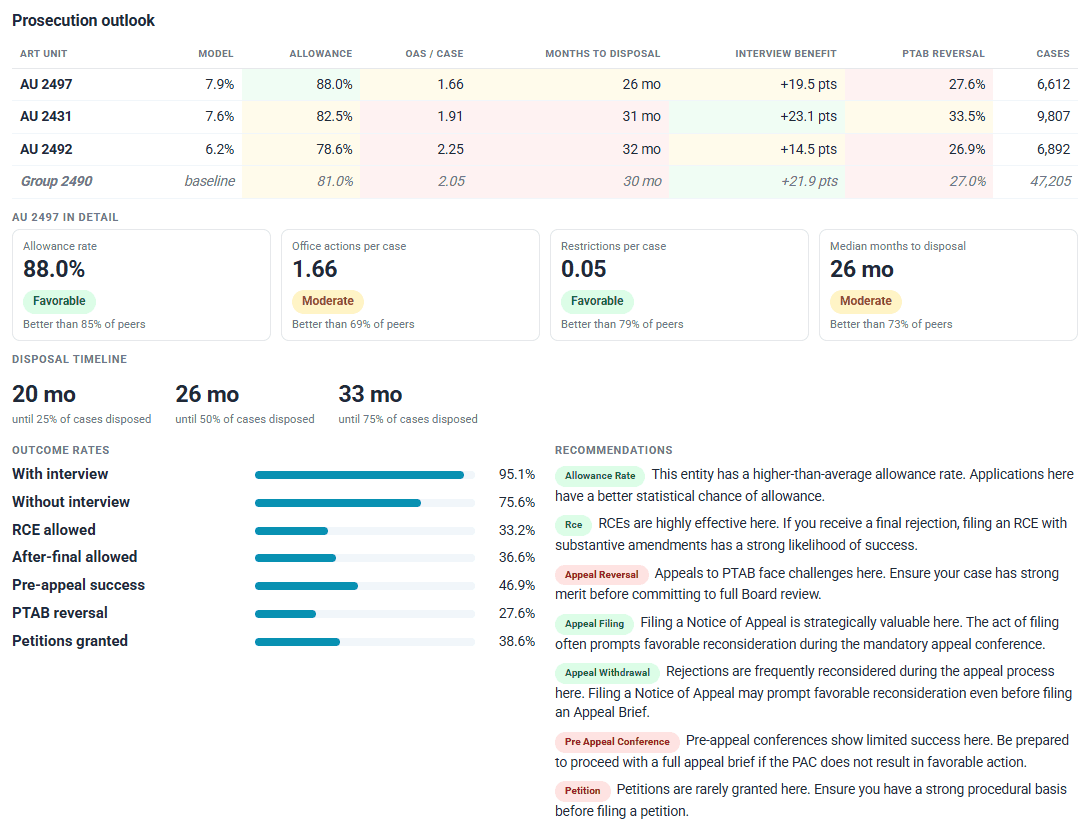
The prediction and what it means for prosecution, side by side. These are history, not a forecast, but they show you what you’re likely walking into.
Built on the USPTO as it really is
In some areas, especially software, networking and communications, the Office runs several art units as one examining pool, and which one you draw is close to a coin flip. We didn’t hide that by merging art units to make the numbers look better. The predictor ranks every art unit separately and shows totals for each examining pool, group and technology center next to them. When the pool is the solid answer, you can see it. You can also see how the odds split across the art units inside it, which matters because those art units don’t always prosecute alike.
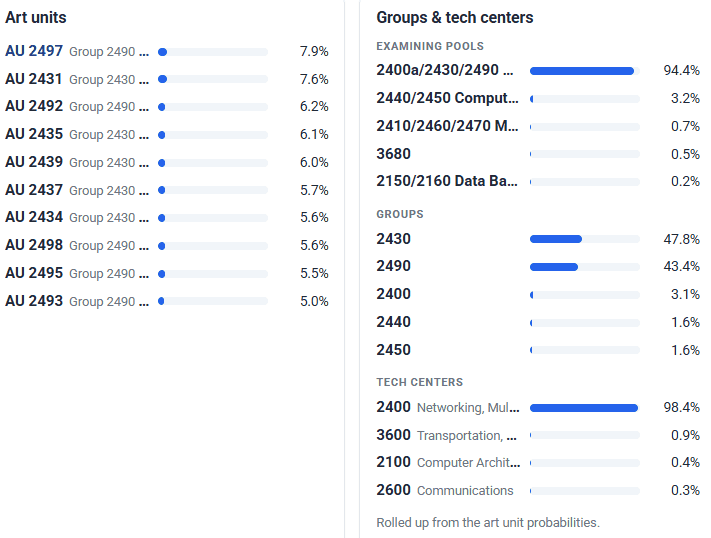
No single art unit stands out here, but the pool clearly does.
A few other things we got right:
- Only art units that exist today. Every prediction is checked against the USPTO’s current Technology Center management rosters, so you never get pointed at an art unit that has been retired or folded into another.
- A confidence label you can act on. High when the top art unit is at 50% or more, Moderate at 25% or more, and Low below that, along with the combined probability of the top three.
- Calibrated probabilities. A 40% prediction means about a 40% chance.
How I use it
- Before filing. I run it on the near-final claims. If the likely group is one I’d rather avoid, the explorer shows me which phrases are pulling me in and which are already pushing me out. I rework the first, keep the second, and re-run it in seconds.
- Checking the read, then searching. I glance at the predicted CPC titles first. If they don’t describe my invention, something in the claims is sending the wrong signal. If they do, I take the top main groups straight into a classification search.
- Setting client expectations. The prosecution outlook turns “it depends on the examiner” into a concrete range of allowance rates and timelines across the likely art units.
- Reading pooled results honestly. When the confidence label says Low but one examining pool holds most of the probability, I plan around the pool and look at how much the art units inside it differ.
- Together with the §101 predictor. Both come with Prosecution Analytics. Running them together gives a quick read on where an application is headed and how much eligibility trouble to expect when it gets there.
Wherever you use N-Spec
The art unit predictor runs on every surface N-Spec does:
- In the browser, with the full interactive report.
- In Microsoft Word, through the N-Spec add-in, right next to the application you’re drafting.
- Over MCP, so you can call it from your own AI assistant or workflow. Results come back as structured data with a built-in legend.
- In the LLM Sandbox, where the agent can run a prediction as part of a larger task and read the results directly.
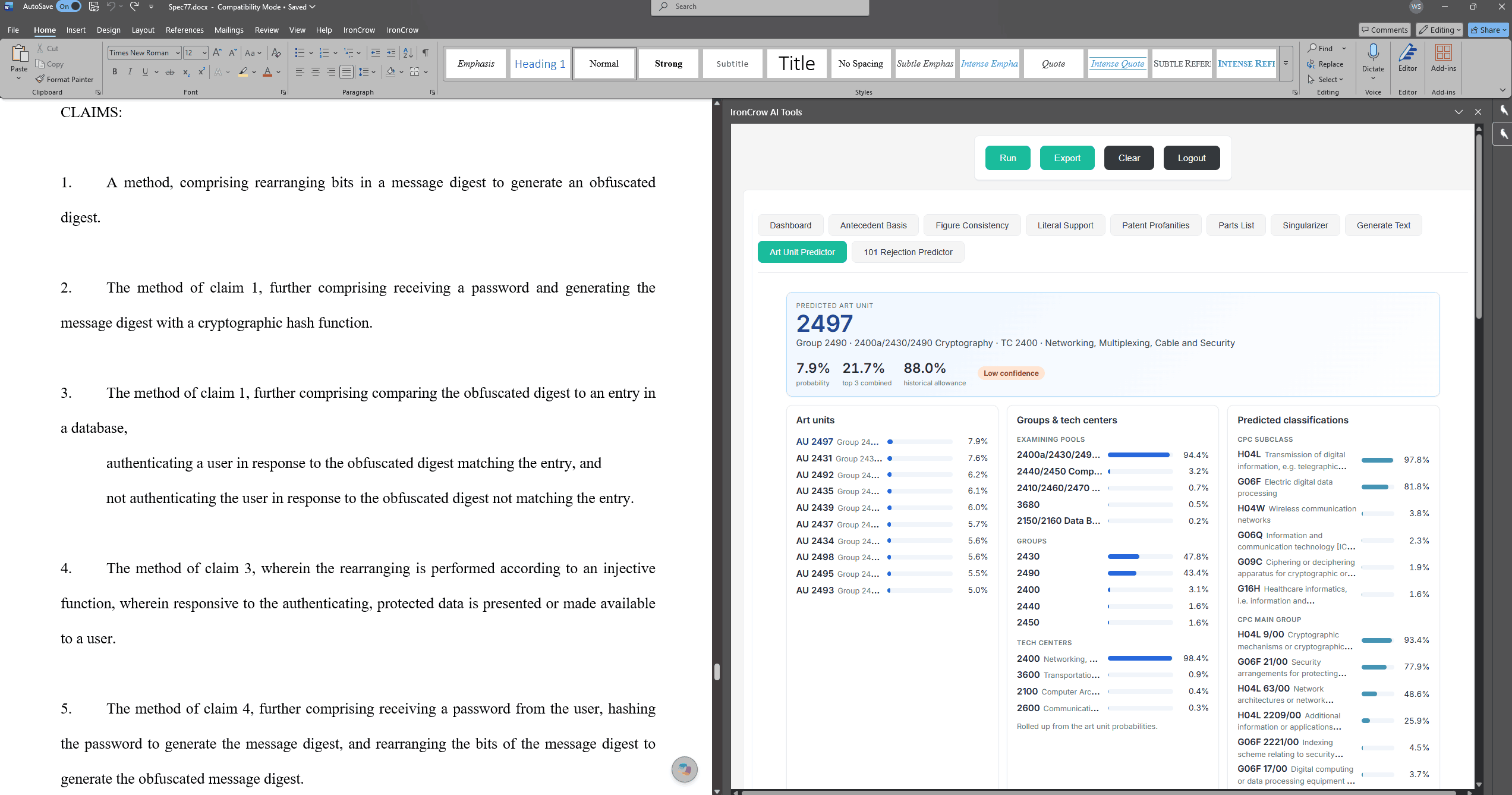
One predictor, wherever you work.
Same price, better predictor
This is a big upgrade, and we’re not raising the price. The new art unit predictor is part of the Prosecution Analytics subscription, which also includes our §101 rejection predictor. If you already subscribe, it’s live for you now at no extra cost. If you don’t, Prosecution Analytics costs exactly what it did before the upgrade.
Give it a try on your next application before you file. As always, we’d love to hear what you think and what you’d like to see next.